Meshbex
Single-file CAD workspace in your browser
Meshbex is a free single-file CAD workspace for engineers, makers, and anyone who needs to work with 3D files, documents, and attachments on their own device.
Why Meshbex exists
Meshbex was originally created at the request of the automotive industry, in response to unsustainable CAD prices, especially when collaborating with suppliers.
Today
Meshbex is used worldwide — far beyond automotive — wherever teams need to work with 3D and related data in a single, unrestricted environment.
A single-file CAD workspace, not only a viewer
Open models in the CAD explorer. Keep 3D, documents, and attachments in one file — in the browser or as a desktop app.
-
Top security
Your data is processed on your PC, not on a Meshbex server.
-
Full app, free for everyone
The full app is available to everyone. No paid plan and no locked features.
-
Fast on a regular PC
Meshbex is a mesh workspace, not a heavy CAD system. A normal laptop is enough for full work — not only viewing.
-
CAD explorer
Open STEP, STL, and GLB. Inspect the assembly, the outliner, and the scene — without a CAD license.
-
Measure, dimension, annotate
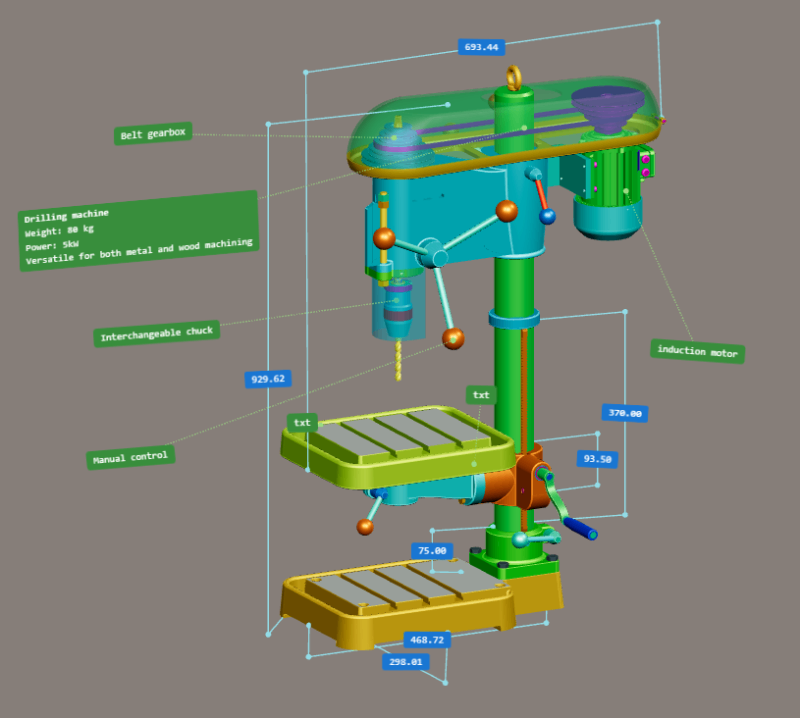
Place measurements, CAD dimensions, and notes on the model. They stay in the GLB.
-
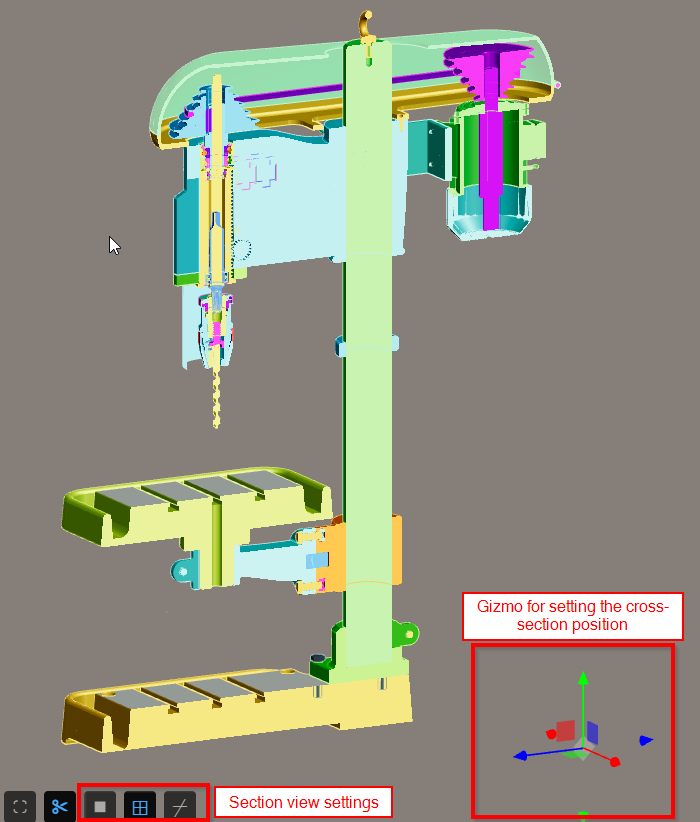
Section views
Cut through the model to see inside.
-
Sequences and arrangements
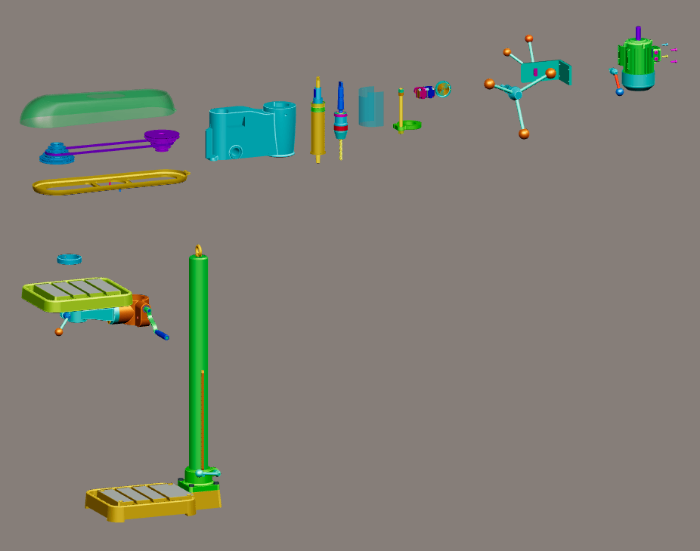
Build animated assembly and explode sequences. Capture named arrangements for exploded, service, or packing poses.
-
Advanced analysis
Volume, mass from density, centre of gravity, and moments of inertia — fast, on a regular PC.
-
Geometry comparison
Compare two geometries with a colour deviation map. Set a tolerance, probe values on the surface, and see min/max and out-of-tolerance areas.
-
Create and edit documents
Write and edit documents as you would in a full-featured text editor. They stay in the GLB with the model.
-
One environment: 3D, docs, attachments
Keep the 3D model, documents, and attachments in one workspace. Open attachments next to the model. Edit images, run OCR, and edit PDF pages. Everything stays in the GLB.
-
File history in the file
Each save can record who saved, when, and a comment. The evidence travels with the GLB — not on a server.
-
Web and desktop, online and offline
Use Meshbex in the browser or as a desktop app. Online or offline. Optional PWA install, no admin rights.
Who Meshbex is for
One file, simple controls — useful beyond the design office.
-
Engineering
Open the model, take dimensions, check mass, compare geometry.
-
Purchasing
Open supplier 3D files locally.
-
Process / technology
Build assembly sequences and named arrangements.
-
Management
Access the model and all related information in one file.
See it in action
Real screenshots from the Meshbex workspace.
One GLB to work in
Why GLB is the primary Meshbex format.
- CAD formats are input. GLB is the workspace. — Import the model, then keep and share the project as GLB — 3D, documents, and attachments together.
- Open standard, no lock-in — GLB from the Khronos Group (the consortium behind OpenGL). No license fee, no proprietary CAD format — the file opens in apps such as Blender, or even Word, Excel, and PowerPoint.
- Compact size — GLB is small compared with STEP, IGES, or other formats. Easier to store, send, and keep locally.
- Fast on a regular PC — GLB opens quickly. A normal laptop is enough to work with the file.
- The whole project in one file — Geometry, materials, hierarchy, documents, attachments, and save history travel together.
- Easy to share — One-file round-trip without losing the workspace: save, send, reopen.
CAD formats to get there
- GLB / glTF
- STL
- OBJ
- FBX
- 3MF
- STEP / STP
- IGES / IGS
Guides
Public help articles — open any of them without launching the app.
-
Beginner guide
Start here if you are new to Meshbex.
-
Users guide — 3D models
Working with models in the CAD Explorer.
-
Screen layout
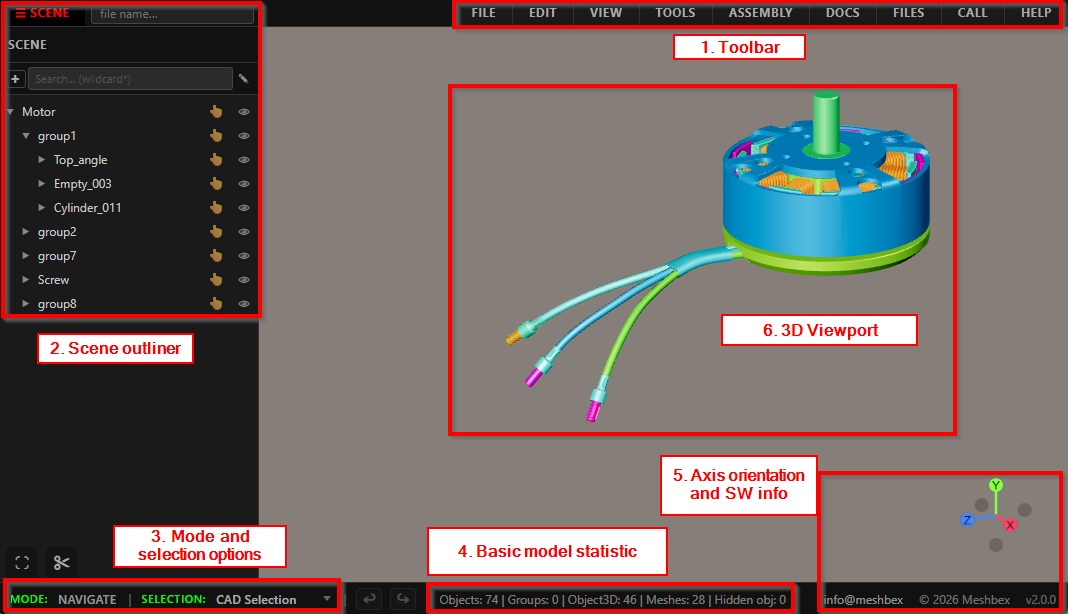
Toolbar, panels, outliner, and viewport.
-
Mouse & keyboard
Navigate, select, and edit with simple controls.
-
Supported file formats
Import and export, including GLB, STEP, and STL.
-
Install as PWA
Offline use in Chrome or Edge — no admin rights.
Frequently asked questions
Price, help, and the Meshbex community.
Is the full Meshbex app free? Do I need an account?
The full Meshbex single-file CAD workspace is free for everyone — no paid plan and no locked features. Open models in the CAD explorer and start working. No registration or login is required.
What if I need help?
Use the public Guides on this page — they open without launching the app. For further help, write to info@meshbex.com.
Can I join the Meshbex community?
Yes. There are three kinds of membership:
- Standard — for people who want e-mail updates on Meshbex news and events.
- Enterprise — a representative of a company that uses Meshbex. Requests for fixes and improvements have higher priority.
- Developers — access to the source code.
To join, contact info@meshbex.com.